All-Domestic Industrial-Grade Switch: 2-Fiber, 4-Ethernet Port Solution
All-Domestic Industrial Switch Solution
A network solution featuring domestically produced main chips and components, widely applied in communication networks for critical national industries such as power grids, military, and highways.
A "fully domestic industrial switch," by its literal meaning, implies two things: First, it is fully domestically produced (industrial switch), meaning over 95% of the components inside the switch are manufactured in China. Critical hardware chips, such as the switch chip, management chip, and interface chips, must be researched, developed, and manufactured domestically by Chinese vendors. Second, it is a managed (industrial switch), meaning it can be managed over the network. Managed industrial switches offer three management methods: serial port management, Web management, and network management software management. They provide various network management options, including terminal control port (Console) and Web-based interfaces. This allows network administrators to monitor the switch's operational status and network performance in real-time, either locally or remotely, and to comprehensively manage the working status and modes of all network ports.
Managed Industrial Switch Management Methods:
1. Serial Port Management
Managed industrial Ethernet switches come with a serial cable for management. Connect one end of the serial cable to the serial port on the back of the industrial Ethernet switch and the other end to the serial port of a standard computer. Then power on both the industrial Ethernet switch and the computer. Use the "HyperTerminal" program built into the Windows system for serial data management.
First, open "HyperTerminal" and, after setting the connection parameters, you can interact with the industrial Ethernet switch via the serial cable. This method does not consume the industrial Ethernet switch's bandwidth and is therefore referred to as "out-of-band management."
With this management method, the industrial Ethernet switch provides a menu-driven console interface or a command-line interface. You can use the "Tab" key or arrow keys to navigate through menus and sub-menus, press Enter to execute commands, or use a dedicated command set for industrial Ethernet switch management. Command sets vary between different brands of industrial Ethernet switches, and even within the same brand, commands may differ. Using menu commands is generally more convenient for operation.
2. Web Management
Managed industrial Ethernet switches can be managed via Web (web browser), but an IP address must be assigned to the industrial Ethernet switch. This IP address serves no other purpose than for managing the industrial Ethernet switch. By default, the industrial Ethernet switch has no IP address; this management method can only be enabled after an IP address has been assigned via a serial port or another method.
When managing an industrial Ethernet switch using a web browser, the switch acts as a web server. However, the web pages are not stored on a hard drive but in the switch's NVRAM, and the web program in NVRAM can be upgraded via software. When an administrator enters the industrial Ethernet switch's IP address in a browser, the switch delivers the web page to the computer just like a server, giving you the impression of visiting a website. This method consumes the industrial Ethernet switch's bandwidth and is therefore referred to as "in-band management."
To manage the industrial Ethernet switch, simply click on the corresponding function items on the web page and modify the switch's parameters in the text boxes or drop-down lists. Web management can be performed over a local area network, thus enabling remote management.
3. Network Management Software Management
Managed industrial Ethernet switches all comply with the SNMP protocol (Simple Network Management Protocol), which is a set of internationally standardized network device management specifications. Any device that adheres to the SNMP protocol can be managed via network management software. You only need to install SNMP network management software on a network management workstation to conveniently manage industrial Ethernet switches, routers, servers, and other devices on the network via the LAN. Through the interface of SNMP network management software, this is also a form of in-band management.
With the deep integration of "Internet+" and Industry 4.0 with national foundational industries, "domestication and independent control" has consistently been a fundamental national policy. In response to national initiatives, we are launching a series of products featuring domestic chips, which meet industrial design requirements. The robust IP40 protection rating ensures adaptability to various harsh environments, and DIN rail mounting allows for convenient installation in space-constrained control cabinets. Wide operating temperature range and long service life provide users with a reliable and convenient solution for Ethernet device networking.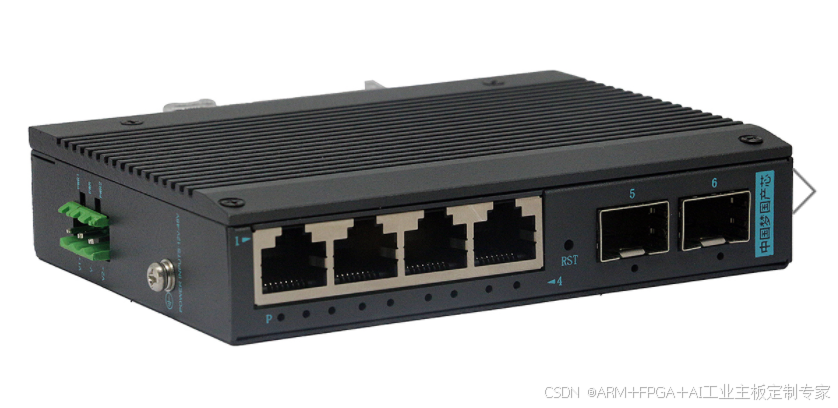
● Domestic chip, independently controllable
● Electrical ports support 10/100/1000M, full/half-duplex, MDI/MDI-X auto-sensing function
● Optical ports support 100/1000/2500M
● Power supply: DC 12-48V with reverse polarity protection
● IP40 protection rating, metal casing, fanless, low power consumption design
● Supports IEEE 802.1Q VLAN for simplified network planning
● Supports ERPS ring network for enhanced network security
● Management features: Supports WEB management method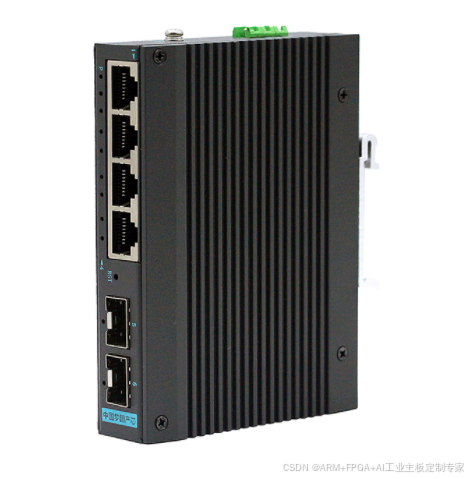
Technical Specifications
Product Name
All-Domestic Industrial Switch, Web Managed, Gigabit, 2-Fiber 4-Ethernet
Product Model
xm3568
Port Description
4 Gigabit Electrical Ports + 2 Gigabit Optical Ports
Network Protocols
IEEE802.3 10BASE-T; IEEE802.3i 10Base-T;IEEE802.3u;100Base-TX/FX;
IEEE802.3ab 1000Base-T; IEEE802.3z 1000Base-X;IEEE802.3x; IEEE802.3af; IEEE802.3at;
RJ45 Ports
10/100/1000BaseT(X) auto-sensing, full/half-duplex, MDI/MDI-X auto-negotiation
Fiber Ports
1000/2500BaseFX SFP ports, optical ports support 100M/1G/2.5G
Twisted Pair Cable
10BASE-T: Cat3,4,5 UTP(≤100 meter)
100BASE-TX: Cat5 or later UTP(≤100 meter)
1000BASE-TX: Cat6 or later UTP(≤100 meter)
Switch Properties
Switching Capacity: 20Gbps
Packet Forwarding Rate: 14.8Mpps
MAC Address Table Size: 4K
Buffer Memory: 4Mbit
Power Consumption: <5W
Protection Rating
IP40
LED Indicators
Power Indicator: P
Interface Indicators: Electrical Port (Link)
Power Supply
Input Voltage: DC12~48V (3-Pin)
Terminal Block: Phoenix Terminal
Supports reverse polarity protection
Other Specifications
Operating Environment
Operating Temperature: -40~75 °C (-40~175 °F)
Storage Temperature: -40~85 °C (-4