Research on PCIe Topology Applications in AI Servers Based on All-Domestic PCIe Switch 4.0/5.0 (Part 1)
1 Introduction
To meet the data collection and processing demands in fields such as big data, cloud computing, and artificial intelligence, various forms of heterogeneous AI servers have been widely adopted. CPU+GPU is a commonly used computational unit combination in AI servers [1]. Among these, P2P (Peer-to-Peer) communication is used in multi-GPU systems, and with the aid of caching devices, PCIe resources can be effectively utilized for data exchange between GPUs [2].
For GPU-accelerated applications, the industry has seen research focused on various software tools, hardware configurations, and algorithm optimizations. In 2016, Shi et al. [3] compared software tools for GPU-accelerated deep learning (Caffe, CNTK, TensorFlow, and Torch, etc.) through performance benchmarking. In 2018, Xu et al. [4] investigated the combined effects of software and hardware configurations, identifying the application characteristics and functionalities of different open-source deep learning frameworks, and further quantifying the impact of hardware attributes on deep learning workloads. In 2019, Farshchi et al. [5] used FireSim to integrate the open-source deep neural network accelerator NVDLA (NVIDIA Deep Learning Accelerator) into a RISC-V SoC on Amazon CloudFPGA, evaluating NVDLA's performance by running the YOLOv3 object detection algorithm. However, there is limited research on the analysis of AI servers in various application scenarios based on the CPU+GPU architecture.
This paper primarily investigates the application scenarios of three typical PCIe topologies in AI servers: Balance Mode, Common Mode, and Cascade Mode. The aim is to analyze the point-to-point bandwidth and latency, double-precision floating-point performance, and deep learning inference performance of these three topologies to identify their advantages and disadvantages in various application scenarios, thereby providing optimal configuration guidance for practical AI server applications.
2 Typical Topology Structures
2.1 Three Basic Topology Structures
(1) Balance Mode.
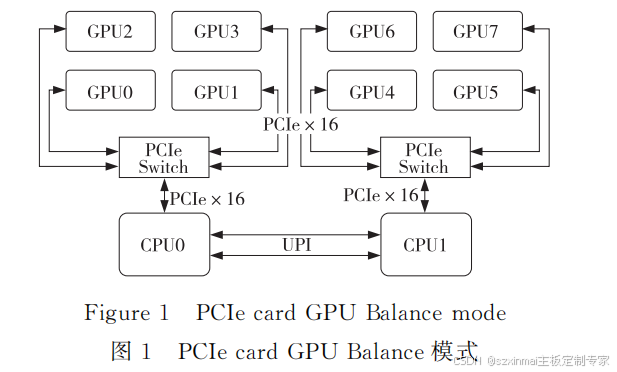
The Balance Mode topology is dual-root. It evenly distributes GPUs to each CPU based on PCIe resources. GPUs under the same PCIe Switch can achieve P2P communication. GPUs connected to different CPUs require communication across the Ultra Path Interconnect (UPI) to communicate. Taking 8 GPU cards as an example, the Balance Mode topology is shown in Figure 1.
(2) Common Mode.
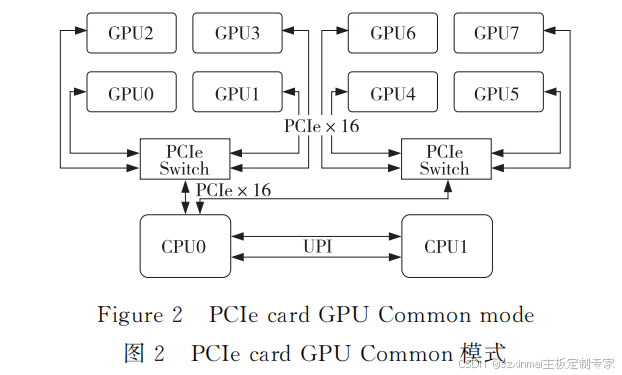
In the Common Mode topology, all GPU PCIe resources originate from a single CPU. GPUs under the same PCIe Switch can achieve P2P communication. GPUs connected under different PCIe Switches require crossing the CPU PCIe Root Port to achieve P2P communication, but the communication bandwidth is lower than P2P communication under the same PCIe Switch. Taking 8 GPU cards as an example, the Common Mode topology is shown in Figure 2.
(3) Cascade Mode.
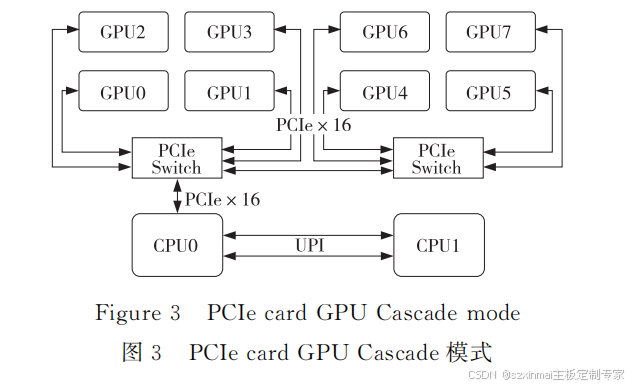
In the Cascade Mode topology, all GPU PCIe resources originate from a single CPU PCIe Root Port. PCIe Switches are cascaded, and GPUs under the same level of PCIe Switch can
achieve P2P communication. P2P communication can also be achieved between GPUs under the first-level PCIe Switch and GPUs under the second-level PCIe Switch, without needing to pass through the CPU PCIe Root Port. Taking 8 GPU cards as an example, the Cascade Mode topology is shown in Figure 3.
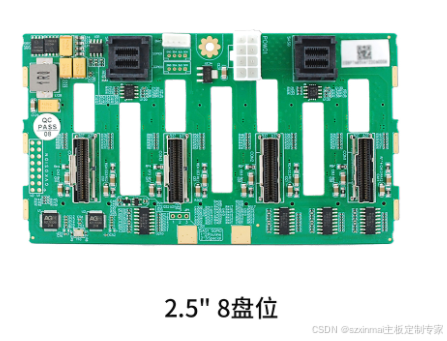
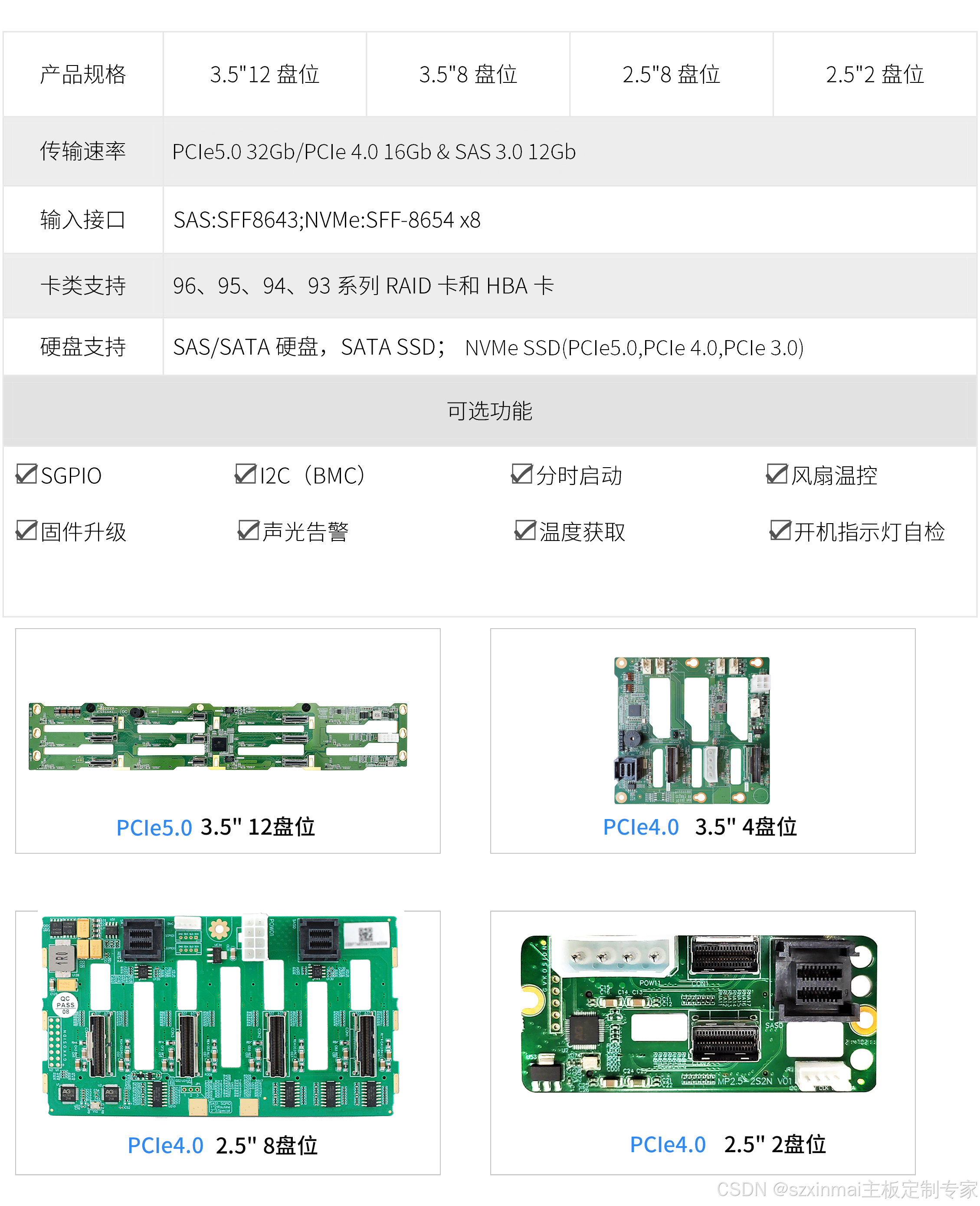
All-Domestic PCIe 4.0/5.0 Switch NVMe Hybrid Direct-Connect Backplane
- Hot-swappable drive functionality;
- LED indicators for drive power-on, read/write activity, and error status;
- SPGIO drive error reporting functionality;
- Timed drive startup;
- Fan temperature control;
- I2C (BMC);