Development and Experimental Verification of a Multi-type Synchronous Signal Acquisition Instrument Based on ARM+FPGA+AD Platform (Part 1): Host Computer Software Design
Host Computer Software Design for the Acquisition Instrument
This chapter develops a C#-based host computer software for operating various functions of the multi-type synchronous signal acquisition instrument. Starting from the data transmission requirements of the acquisition instrument, the host computer uses the Ethernet UDP protocol to achieve data interaction with the acquisition instrument, including sending control and configuration information to the acquisition instrument, receiving AD data transmitted from the acquisition instrument, and then parsing the data. Following user-oriented principles, a graphical user interface (GUI) is developed to implement performance configuration, data visualization, and local storage functions.
4.1 Overall Design
The multi-type synchronous signal acquisition instrument developed in this paper can configure the AD chip based on configuration information received via the UDP protocol, and send synchronously acquired AD chip data via the UDP protocol. Therefore, the host computer software used to operate various functions of the acquisition instrument will implement the following features: develop a UDP slave to establish communication with the acquisition instrument's UDP master; send configuration and control information to the acquisition instrument via the UDP protocol; receive AD data sent by the acquisition instrument via the UDP protocol; develop a user-oriented graphical user interface (GUI); and implement data configuration, data visualization, and local storage functions.
Based on the above requirements analysis, the host computer software model can be divided into a main interface module, a data interaction module, a data configuration module, a data visualization module, and a data local storage module. These five modules are used to implement various functional operations of the acquisition instrument. The functional module structure is shown in Figure 4.1.
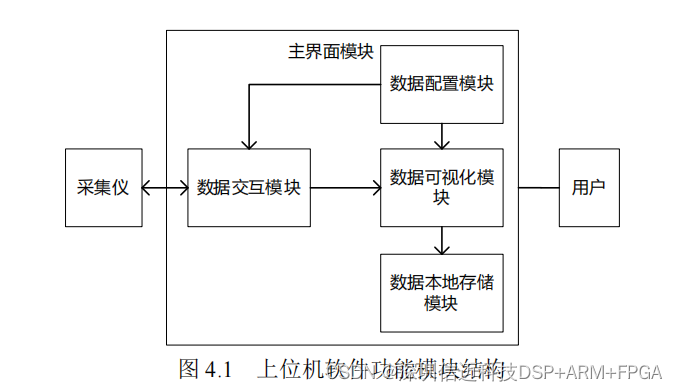
The functions implemented by each module of the host computer are as follows:
(1) Main Interface Module: Builds the overall GUI interface, with subsequent sub-interfaces added within the main interface.
(2) Data Interaction Module: Establishes a UDP slave to set up UDP communication with the acquisition instrument, sends configuration information from the data configuration module to the acquisition instrument via the UDP protocol, receives AD data sent by the acquisition instrument via the UDP protocol, and transmits it to the data visualization module.
(3) Data Configuration Module: Establishes a data configuration interface where users can set the type and sensitivity of the AD chip for each channel. Type information is sent to the acquisition instrument for configuration, and sensitivity information will be used by the data visualization module to parse the data.
(4) Data Visualization Module: Establishes a data visualization interface that processes AD data sent by the acquisition instrument based on sensitivity information, allowing users to observe the change curves of data for each channel.
(5) Data Local Storage Module: Establishes a data local storage settings interface where users can store the parsed AD data as required for monitoring.
4.1.1 C# Programming Language
C# is a modern, general-purpose, object-oriented programming language developed by Microsoft. It is favored by a wide range of programmers for its concise syntax and powerful performance. While approaching the concepts of C and C++, it also incorporates features of Java and provides visual tools, enabling convenient, fast, and efficient development of GUI interfaces and other applications. Therefore, this paper chooses C# to write the host computer software for the acquisition instrument, completing its control and configuration functions.
C# includes the following features:
(1) Simple and Secure. C# provides namespaces for file management, allowing the use of the using keyword to add namespaces; it has a wide range of data types, and the size of each data type is fixed; unlike C++ and C, it does not use pointers, thus avoiding dangerous operations that directly read memory, which meets the stable monitoring requirements of structural health monitoring systems.
(2) Object-Oriented and Component-Based. Encapsulation, inheritance, and polymorphism ensure the high development efficiency of the C# programming language; a large number of standard libraries and component versions greatly facilitate GUI interface development.
(3) Supports Multiple Program Types. It can develop not only Windows Forms GUI applications but also web applications and mobile applications.
(4) Compilable on Multiple Computer Platforms. It can be used on Windows, Linux, and Mac systems.
(5) Supports Automatic Garbage Collection. This can save a significant amount of system resources.
4.1.2 File Structure
This chapter stores all resources and program files of the host computer under the eDAQ_Sampling_Software project file. The file structure is shown in Figure 4.2.
The main program files are introduced as follows:
(1) Program.cs: The entry point for the host computer's main program.
(2) Form_Dashboard.cs: The main GUI interface of the host computer.
(3) Form_Welcome.cs, UDP_Comm.cs, UDP_Config.cs: Data interaction module.
(4) Form_Config.cs: Data configuration module.
(5) Form_Chart.cs, Channel_Parameters.cs: Data visualization module.
(6) Form_Save.cs, Form_Save_Setting.cs: Data local storage module.
4.1.3 Main Program Entry
The main program uses the System.Windows.Forms namespace, which is fundamental for developing Windows GUI interfaces. By utilizing the numerous classes it contains, rich user interface functionalities can be implemented conveniently and quickly.
In the Main function, the EnableVisualStyles and SetCompatibleTextRenderingDefault methods of the Application class can first be used to initialize the GUI interface. Finally, the Run function is used to launch the Form_Dashboar class, which is the main GUI interface.
4.2 Main Interface Module Design
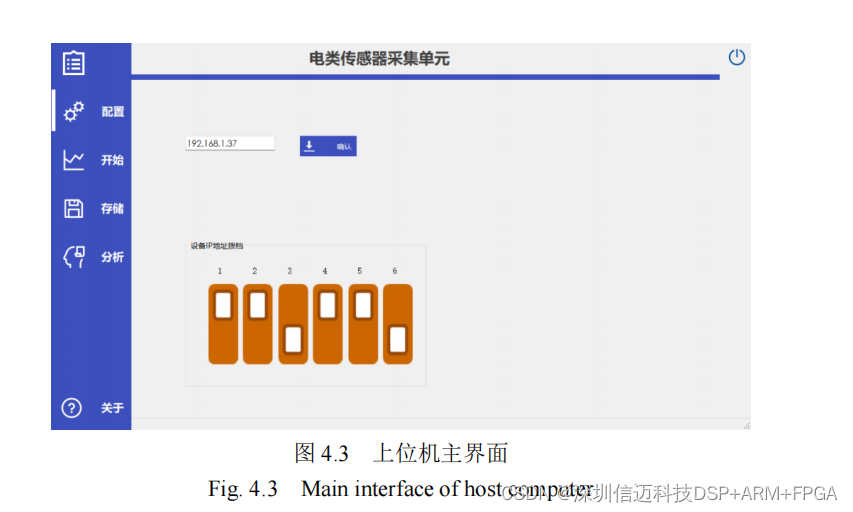
The host computer's main interface is built by creating the Form_Dashboard class, which inherits from the Form class. The main interface, shown in Figure 4.3, consists of two parts: a left-side menu bar and a right-side function panel.