Software Design for Intel SoC+FPGA-based Smart Cockpit and Advanced Driver-Assistance Systems (Part 3)
Introduction to Virtualized Operating Systems
In-vehicle platforms are showing a trend towards convergence. With the rapid growth in computing performance and applications of in-vehicle SoCs, there's a challenge of integrating multiple applications across various display subsystems, which necessitates the platform to run multiple operating systems. Virtualization technology is developing rapidly. System virtualization is a type of virtualization technology, and with the significant advancements in current CPU technology and performance, the time for virtualization technology to be truly commercialized has arrived. System virtualization refers to virtualizing a single physical computer system into one or more virtual computer systems. Each virtual computer system (referred to as a virtual machine or VM) possesses its own virtual hardware (e.g., CPU, memory, and devices) to provide an independent VM operating environment. By emulating the virtualization layer, the operating system within the VM believes it is still running on a dedicated system. The operating systems in each VM can be completely different, and their execution environments are completely independent. The architecture of system virtualization is shown in Figure 4.1.
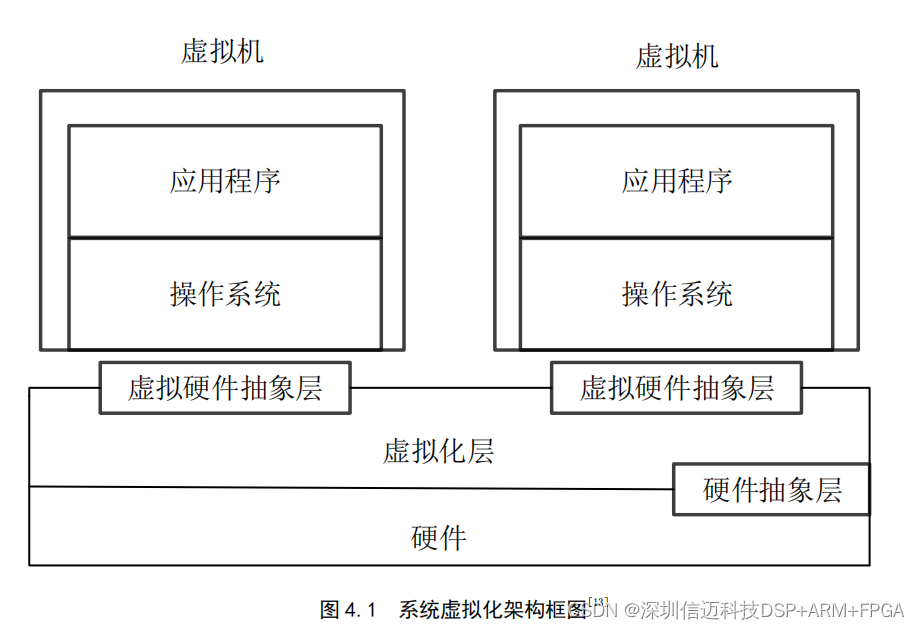
In a virtual environment, physical resources are called the Host, and virtualized resources are called the Guest. For example, if a physical computer is virtualized into multiple virtual computers, then this physical computer is called the Host Machine, and the virtual machines running on it are called Guest Machines. The operating system running on the Host Machine is called the Host OS, and the operating system running in the virtual machine is called the Guest OS.
4.1.1 In-Vehicle Virtualization System Architecture
A typical virtualization system consists of three parts: hardware, a Virtual Machine Monitor (VMM), and virtual machines. By building a virtualization layer on the underlying hardware processor, it enables the simultaneous and independent operation of multiple operating systems, such as infotainment systems and instrument cluster systems, thereby maintaining the security of the entire automotive system [14]. When an application in the infotainment system encounters an issue, it will not affect the normal operation of applications in the instrument cluster system. Software that meets different requirements and has different security demands can coexist and share resources. At the same time, through virtualization technology, different functional systems and software can share images and drivers, achieving seamless interaction and information fusion between the central control screen, instrument cluster screen, rear-seat entertainment screen, and HUD projection screen. Figure 4.2 describes the overall architectural block diagram of this system's virtualized operating system.
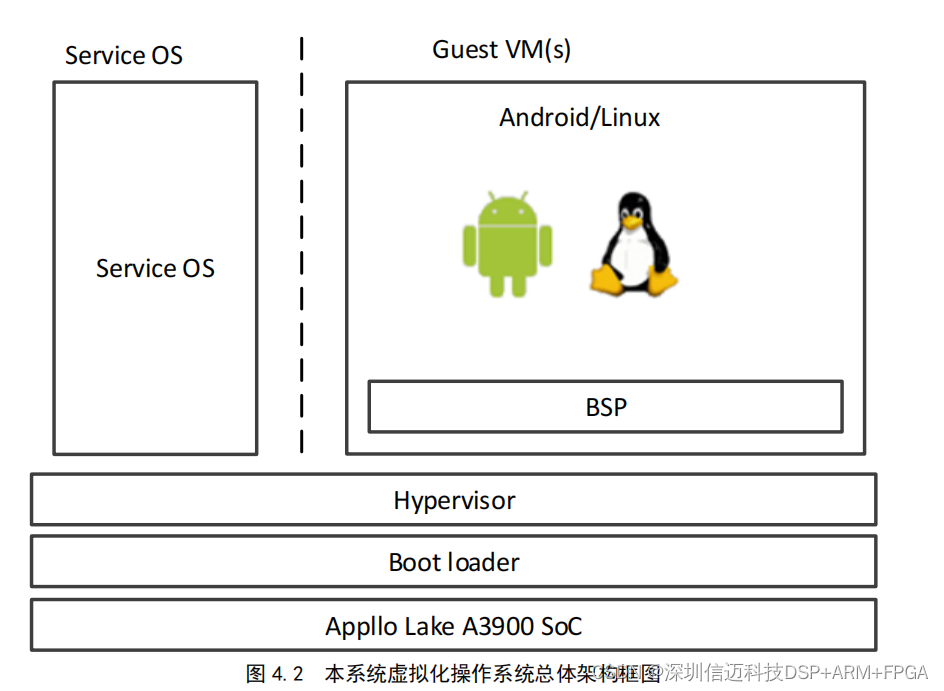
Generally speaking, the Virtual Machine Monitor (VMM) virtualizes physical resources by performing three main tasks: processor (CPU) virtualization, memory virtualization, and I/O virtualization. A virtual machine is composed of virtual processors, virtual memory, virtual I/O devices, and so on. The main function of the VMM is to create corresponding virtual resources based on physical resources, form virtual machines, and provide a virtual platform for guest operating systems.
Processor virtualization requires enabling multiple operating systems to share the CPU. The allocation of the CPU is configurable, and through flexible configuration methods, different mappings between virtual CPUs and hardware CPUs can be achieved to meet actual CPU allocation requirements. It also solves the problem of communication between CPUs of different architectures. Memory virtualization can achieve efficient memory sharing among virtual nodes, ensuring reasonable resource allocation. I/O virtualization solves the problem of peripheral device virtualization. Depending on the application, it performs virtualization and shared processing for peripheral devices, including audio, video, input video decoding, storage devices, USB devices, and so on.
This in-vehicle virtualized operating system can provide excellent support for hardware resource sharing, including digital instrument clusters, in-vehicle infotainment systems, and rear-seat entertainment systems. In the automotive domain, there is significant sharing of image processing, where various images collected by cameras need to be shared promptly across different display terminals, as well as sharing of peripheral devices like audio resources, with different display terminals playing different program sources. Considering overall system security, IVI and RSE systems run as isolated virtual machines.
4.1.2 Applications of System Virtualization
Virtualization technology has undergone rapid development for many years, with many mature products emerging in the market, ranging from early servers, desktops, industrial, and consumer electronics to current smart cars and other fields. For example, Xen is a relatively mature and typical commercial product application. It is open-source virtualization software based on the GPL license.
Human-Machine Interface (HMI) Technologies: This system enables interaction between humans and vehicles, allowing vehicle owners to grasp vehicle information and control the vehicle. Diverse input interaction methods combined with multi-screen integration and personalized UI on the output side bring a new interactive experience.
Currently, input methods primarily based on buttons and touchscreens cause driver distraction. Smart driving HMI combines diverse interaction methods such as touch, voice control, and gesture control. Smart driving HMI comprehensively adopts diverse technical means such as voice control and gesture control to provide drivers with a better interactive experience [15]. Smart driving HMI, through the combination of central control screen, LCD instrument cluster, and head-up display (HUD) multi-screens, as well as personalized User Interface (UI) design, provides drivers with clear information prompts.
Currently, automotive central control screens and instrument panels are clearly no longer limited to basic vehicle data display. They are gradually transitioning towards intelligence and digitalization, integrating multiple functions such as vehicle status, road condition information, in-vehicle navigation settings, and vehicle control. Drivers face a large amount of information that needs to be processed during driving. In this system's main control display interface, making a phone call has the highest priority. When making a phone call from the navigation interface, a separate call window can be added without exiting the navigation interface. This requires the system software's operating system, through virtualization technology, to easily achieve multi-task display on a single screen.
Smart driving HMI adopts large-sized, high-definition in-vehicle display terminals, combining central control screen, LCD instrument cluster, and HUD multi-screens, along with personalized UI interface design, to achieve information segmentation and classification, integrate and analyze multiple information streams, presenting the necessary information to the driver in the optimal way, bringing an intuitive interactive experience. Figure 4.3 describes the application of in-vehicle system virtualization.
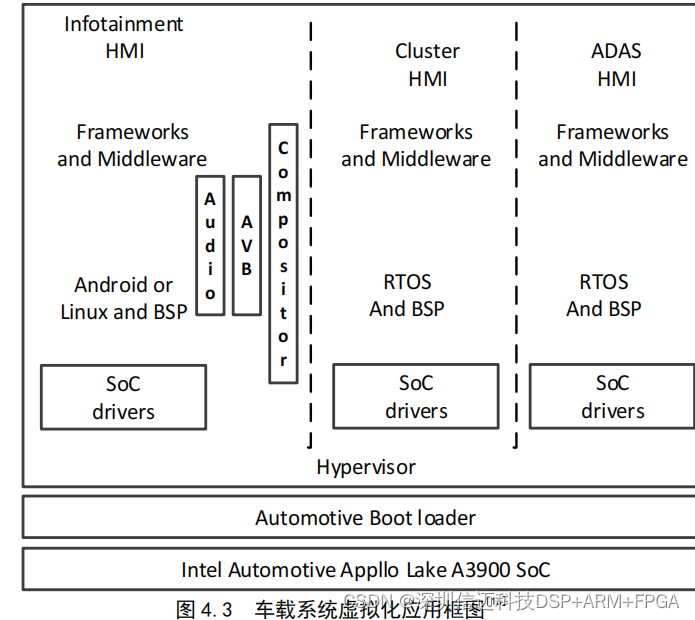
In this in-vehicle virtualization solution, the Hypervisor runs directly on the A39