基于AM5728 Caffe 机器学习案例-darknet物体分类与人脸识别
Title: AM5728 Caffe Machine Learning Example – Darknet Object Classification and Face Recognition
Content:
1 YOLO Darknet Porting and Application Development
YOLO is an end-to-end real-time object detection system based on deep learning methods. Darknet is the implementation of YOLO, but Darknet includes more than just YOLO—it also contains other components.
This experiment mainly introduces how to port the YOLO Darknet machine learning framework to the AM5728 platform, and demonstrates a darknet-master example for image recognition. For ease of testing, the Xinmai XM5728-IDK-V3 development board provides verified test files located in the "Demo\app\Yolo_Darknet\bin" directory on the installation disc. The bin folder contains: the required yolo.weights file, the compiled darknet executable, the cfg folder (configuration files), and the data folder (image data). The following section details the specific compilation method for the darknet-master project.
1.1 Compiling the darknet-master Project
Open Ubuntu and execute the following command to create a working directory at "home/tronlong/AM57xx/Yolo_Darknet".
Host# mkdir -p /home/xmtech/AM57xx/Yolo_Darknet
Copy the source code archive "Demo\app\Yolo_Darknet\src\darknet-master.zip" from the installation disc to the "home/xmtech/AM57xx/Yolo_Darknet" directory, then extract it to the current directory.
Host# unzip darknet-master.zip
Enter the darknet-master source directory and modify the Makefile as shown below:
Host# cd darknet-master/
Host# vi Makefile
Modify the following lines:
CC=arm-linux-gnueabihf-gcc
AR=arm-linux-gnueabihf-ar
After modifying the Makefile, save the file and execute the following command to load the environment variables for the corresponding platform's Linux Processor-SDK. Adjust the Linux Processor-SDK path according to your actual installation path.
Host# source /home/xmtech/ti-processor-sdk-linux-am57xx-evm-03.01.00.06/linuxdevkit/environment-setup
Run the make command to compile the darknet-master project. After successful compilation, the darknet executable and other files will be generated in the current directory.
Host# make
1.2 Downloading the YOLO Training Model File
In the darknet-master directory, run the following command to download the YOLO training model file into the current directory. The downloaded file will be named yolo.weights, as shown below.
Host# wget https://pjreddie.com/media/files/yolo.weights
After the download completes, copy the entire compiled darknet-master folder to the development board's file system under "/home/root".
1.3 Running the Program on the Development Board
Power on the development board and enter the file system. Navigate to the darknet-master directory and run the following command:
Target# cd darknet-master/
Target# ./darknet detect cfg/yolov2.cfg yolo.weights data/dog.jpg
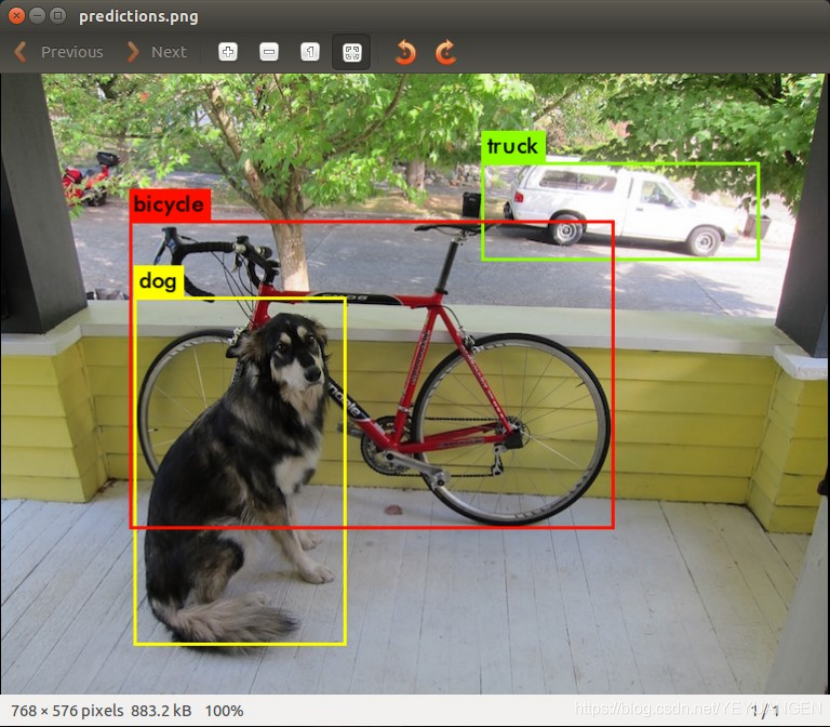
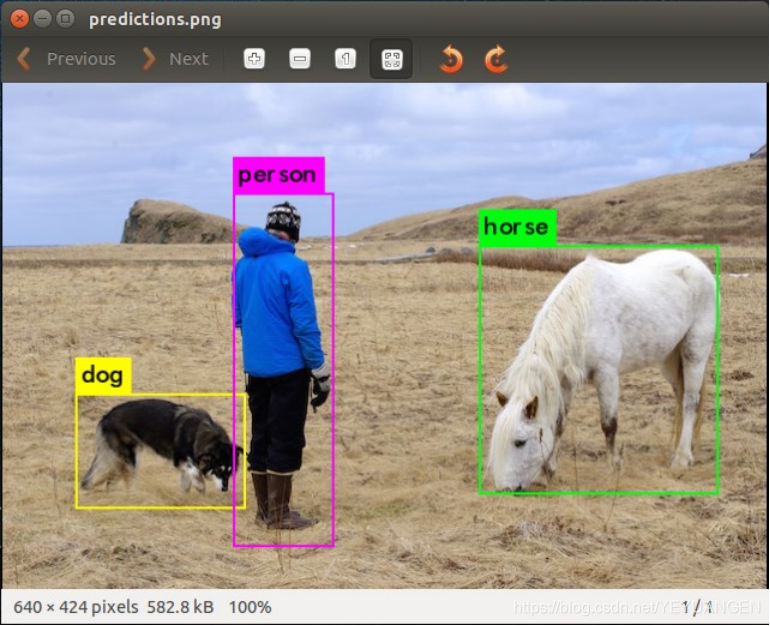
After the program finishes running, a file named predictions.png will be generated in the darknet-master directory. Copy predictions.png to your PC to view it. The resulting image will look like the one shown below.
3 Face Detection Example Based on the Caffe Framework
This experiment implements a face detection example using the Caffe framework. Before conducting this test, please ensure that the Caffe framework has been successfully ported to the Xinmai XM5728-IDK-V3 development board as described in previous steps.
Since the resolution of the tmp.jpg test image in the sample code is relatively high, using the 4.3-inch or 7-inch LCD screen that comes with the development board may result in incomplete image display and reduced visual quality. Therefore, using an HDMI display is recommended for better results in this experiment.
3.1 Compiling face_detection
Copy the example source archive "Demo\app\caffe_transplant\caf_face_detection.zip" from the installation disc to the "/home/root" directory of the development board's file system. Execute the following command to extract "caf_face_detection.zip" in the current directory.
Target# unzip caf_face_detection.zip
Then run the following commands to enter the caf_face_detection source directory and modify the Makefile as shown below:
Target# cd caf_face_detection/caf_face_detection/integrated_caffe/
Target# vi Makefile
In the opened Makefile, modify the library and include paths according to the actual installation directory of the Caffe framework as follows:
LIBS := -L/usr/lib/ -L/home/root/caffe-master/build/lib
INCLUDE := -I. -I/home/root/caffe-master/include
Run the make command. After compilation completes, the executable file face_detection will be generated in the current directory.
3.2 Face Detection Example
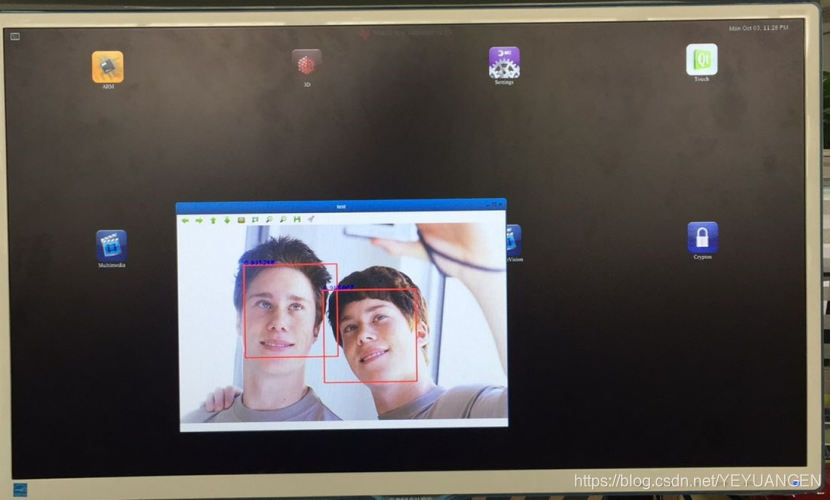
Ensure that an HDMI display is connected to the development board. Run the following command to execute face_detection. The program will detect faces in the tmp.jpg file located in the same directory. Information will be printed to the serial terminal, and the HDMI display output will appear as shown below:
Target# ./face_detection