TI AM5728 DSP+ARM+FPGA Heterogeneous Multi-Core Industrial Control Processor
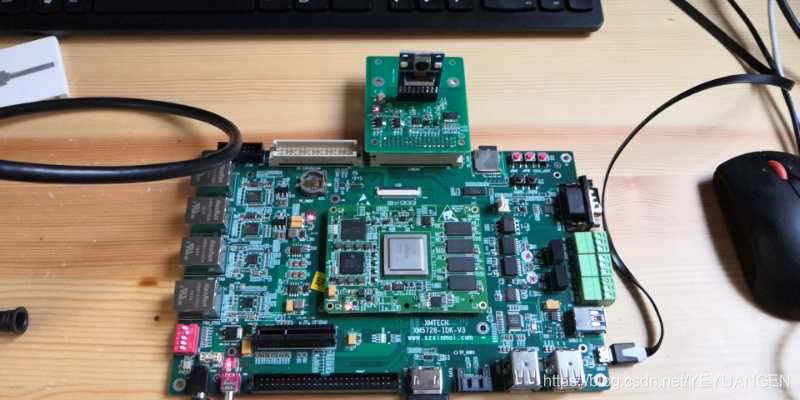
TI AM5728 DSP+ARM+FPGA heterogeneous multi-core industrial control processor.
The DSP handles complex algorithm processing, the ARM manages general-purpose tasks, and the FPGA performs high-speed signal acquisition—forming an ideal high-performance embedded industrial motherboard combination.
DSP Algorithm Development
For DSP algorithms, in addition to performance and efficiency considerations, integration requirements dictate that the ARM must be able to invoke DSP algorithms via Codec Engine. Therefore, you need to:
- Be familiar with the xDAIS and xDM standards. Begin by understanding xDAIS, as xDM is merely an extension of xDAIS. Starting from xDAIS 6.10, a tool called QualiTI is included, which can verify whether your DSP algorithm complies with the xDAIS standard (though it does not check for xDM compliance). For details, refer to: http://processors.wiki.ti.com/index.php?title=QualiTI_XDAIS_Compliance_Tool.
- Be familiar with Framework Components. Framework Components mainly consist of two modules: DSKT2 and DMAN3, which manage memory and EDMA resources on the DSP side, respectively. Any memory used by a DSP algorithm must first be requested from and allocated by DSKT2. Similarly, EDMA channels used by the algorithm must be requested from and allocated by DMAN3. QDMA operations are handled through the ACPY3 module. This approach simplifies integration of multiple DSP algorithms, eliminating concerns about resource (memory and EDMA) conflicts between different algorithms. Cache coherency issues may arise on the Codec Engine DSP side. Refer to: http://wiki.davincidsp.com/index.php?title=Cache_Management.
DSP System Integration
Typically, DSP algorithm engineers compile their xDM-compliant algorithms into a .lib file (or .a64P) for use by DSP system engineers. The DSP system engineer then builds a DSP Server (i.e., a DSP executable .x64P file, similar to the .out file generated in CCS). (Refer to http://focus.ti.com/lit/ug/sprued5b/sprued5b.pdf, which discusses .xdc and .bld files. Users of Codec Engine 1.20 and later versions need not delve into these details immediately, as tools will automatically generate these files, as described later.)
-
If you have a .lib file (or .a64P) (the algorithm must comply with the xDM standard), how do you generate your own DSP Server? The following URL provides a detailed introduction to the RTSC Codec and Server Package Wizard tool, guiding you through packaging a .lib file into an RTSC Codec package and an RTSC DSP Server package, and ultimately building the DSP executable .x64P:
http://processors.wiki.ti.com/index.php?title=RTSC_Codec_And_Server_Package_Wizards
http://processors.wiki.ti.com/index.php?title=I_just_want_my_video_codec_to_work_with_the_DVSDK -
If you are using a version of Codec Engine earlier than 1.20, refer to the example located at examples/servers/video_copy under the Codec Engine installation path. In this case, you must understand the functions of .xdc and .xs files mentioned in sprued6c.pdf and sprued5b.pdf. You can modify the relevant files from the video_copy example to manually create your own RTSC Codec and RTSC DSP Server packages.
-
After creating the RTSC Codec and RTSC DSP Server packages, the next step is building the .x64P executable. The key is modifying the user.bld and xdcpaths.mak files to correctly set the paths for other software modules and tools that Codec Engine depends on.
-
If your hardware's DDR2 size differs from the example's 256 Mbytes, you must modify the DSP .tcf file and other configurations. For guidance on memory allocation, determining segment sizes (e.g., DDRALGHEAP and DDR), and configuring parameters in ./loadmodules, refer to: http://wiki.davincidsp.com/index.php?title=Changing_the_DVEVM_memory_map.
ARM Application Development
ARM application engineers need to call the Codec Engine VISA API to build the ARM-side executable program. Therefore, it is essential to study the relevant VISA APIs, learn how to create Codec Engine packages and configuration files on the application side based on your specific use case. (Refer to http://focus.ti.com/lit/ug/sprue67d/sprue67d.pdf, which also covers Codec Engine debugging.)
-
Understand the flow of ARM applications calling Codec Engine, the VISA API, and other Codec Engine APIs. You can refer to the example located at examples/apps/video_copy under the Codec Engine installation path (simpler) or the encode/decode/encodedecode examples in the demos directory under the DVSDK installation path (more complex).
http://wiki.davincidsp.com/index.php?title=Configuring_Codec_Engine_in_Arm_apps_with_createFromServer -
Understand the ceapp.cfg file. Refer to sprue67d.pdf for related information, and start by studying examples/apps/video_copy/ceapp.cfg.
-
Use the method described in section 4.2 3) to learn how to build the ARM-side executable.
-
For guidance on calling Codec Engine in a multi-threaded environment, refer to:
http://wiki.davincidsp.com/index.php?title=Multiple_Threads_using_Codec_Engine_Handle -
Additionally, refer to the following three documents for more details on the structure, thread scheduling, and other specifics of TI demo ARM applications.